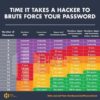

People always wonder about creating a secure password. Everyone knows that you should avoid the common passwords like “password1″ or “123456″ but most people don’t really know why. This post will examine how hackers can “crack” a password and what they do with them as well as giving you tips on how to create a secure one. Some people believe that the only way to create a secure password is to make it random numbers and letters that are hard to remember I will show that in fact, its possible to make a secure password using only normal lowercase dictionary words.
How hackers do it
Many of my clients have security concerns and so it’s only logical that a good web-developer be well versed in offensive security. As they say, the best defense is a good offence.
So how would a hacker start? The first thing they would do is gain access to a database, that is the place where all the passwords are stored. There are many ways to do this and I won’t be covering them in this post, however if you would like to know more send me an email or leave a comment and I’ll do my best to answer. After they get access to the database they don’t right away have a list of passwords. Instead they have a list of usernames and passwords that have been “hashed”.
So what’s a hash? A hash is a technique in which a piece of text (called a string) is put through a process in which it transforms into another string. Parts on the information of the original are lost and the result is a unique string (not necessarily unique but the chances of a repeat are well under on thousandth of a percent) which can not be converted back to the original. For example if you type in the word “Zenzora” a hash function might delete every other letter, then replace all Z’s with q’s and shift every remaining letter up one resulting in the string “QOPB”. Even knowing the process there is no way to turn “QOPB” back into “zenzora” because there is no way of knowing that letters were deleted. This way when you log onto a site and type “zenzora” the server runs it through a hash and gets “QOPB” then checks it with the database to see if it matches. Common use hash functions are actually much more complex than the one I described but you get the idea.
So if these “hashes” are impossible to reverse, how to hackers crack them. The solution relies on something called “rainbow tables” which are massive lists which can take up many gigs of space (just to give you an idea a rainbow table for just numbers at letters for passwords under 8 characters would have about 150 quadrillion entries). These tables contain a list of unhashed and hashed phrases. If a hacker wanted to crack every password in a database, by the time he finished you would both be long dead.
How do hackers solve this problem? Well the short answer is that they use smaller rainbow tables. One’s that only include dictionary words (there’s only about 200,000) and their variations, as well as common passwords. Sure they don’t get as many passwords, but at least they don’t have to wait till the sun explodes.
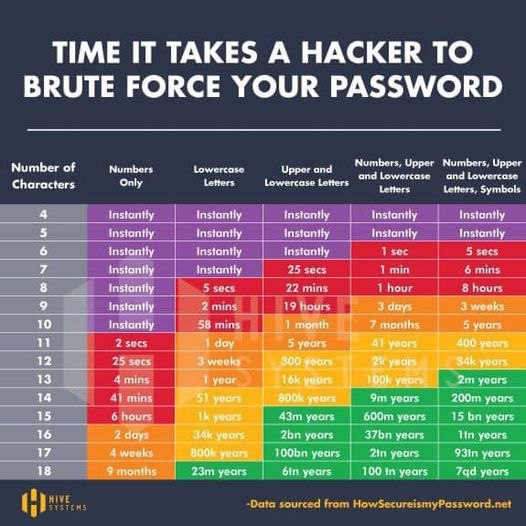
So now lets take a look on creating a secure password that hackers won’t be able to crack. A common misconception is that you need random numbers and letters and weird punctuation to do it. There are many ways to judge password strength (for instance your birthday might be impossible to crack, but easy to guess if someone knows you) for now lets just focus on how many guesses it would take to crack it. Lets make some comparisons.
Fish – 3 bits
This is remarkably easy to crack, a hacker using a dictionary table could crack this is microseconds.
Fi$h – 24 bits
Still pretty easy, but much better
Ov#DYm – 39 bits
Better but hard to remember
Go fish – 45 bits
Whats going on here? It’s just two words, why is it so much better than the last one. That’s because while one word is one in 200,000. Two words are 200,000 squared (about 40 billion). Lets see what happens when you try 3 or more words.
life is good – 59 bits
life is g00d – 62 bits (not much better)
Or how about one for netflix
lets watch a movie – 91 bits
So know you know how to create a secure password. It doesn’t have to be something you can’t remember, just a few words put together will work fine. So now you’re safe right? Well maybe. Even with a secure password its possible that it might be compromised. For example a hacker might be able to get your info some code that catches it before you log on. Or maybe the database doesn’t even use a hash. Potentially they might have a key-logger on your computer. Or even tricked you into giving it out through a technique called social engineering. Sometimes the an employee from the site you sign up for may be discreetly stealing info.
So now what? You’ve created a secure password and its been stolen anyway. The first thing that I recommend is changing your password every few months as well as installing good anti-virus to prevent against key-loggers. Be wary of who you give your password to and try to favor sites with https in the url (the s stands for secure) also make sure the site you are at is really the site you intended to be at (look in the url bar).
Most importantly don’t use the same passwords for different sites. If a hacker has the username victim, and the email address victim@yahoo.com the next step is to check yahoo to see if the passwords happen to be the same. If they are then you’re out of luck, the hacker can now check other sites (like you bank account) and even if you used different passwords, can simply click the forgot password button and reset it. Bank accounts, email accounts, and anything like that need to have distinct passwords.
I tool that I use to keep track of all my passwords is called keePass (http://keepass.info/) it’s free, open source and fairly popular, as a result, the downloads have been checked to see if they match the code provided (and they do). So you can rest easy knowing its safe. All you need to do is set one secure password and it encrypts everything into a database (encryption is different than hashing) and you can copy and paste into web forms. The clipboard even clears after ten seconds. This way you don’t even have to worry about keyloggers. It comes with a password generator to make sure you have secure passwords as well.
In conclusion:
3 word passwords are extreamely secure so don’t hesitate to use them
Don’t reuse passwords
and finally programs like keePass are a great way to manage your passwords without worry
Hopefully this was helpful. Thanks for reading!